AUTOMATED UTG SUBMITTER BUILD LIST
This page provides UTG submitters with an automatically generated IG Publisher build of THO based on the committed changes in their branch. These builds can be used to perform QA to ensure that the proposed changes look as expected and that no errors have been introduced as the proposal moves along in the process. They are not intended for community Consensus Review purposes.
These builds are automatically generated as part of the Submit transition through the UTG Jira workflow process, or from triggering an ad hoc build.
The server maintains only the latest build per UP ticket. Previous builds will be overwritten.
Running builds:
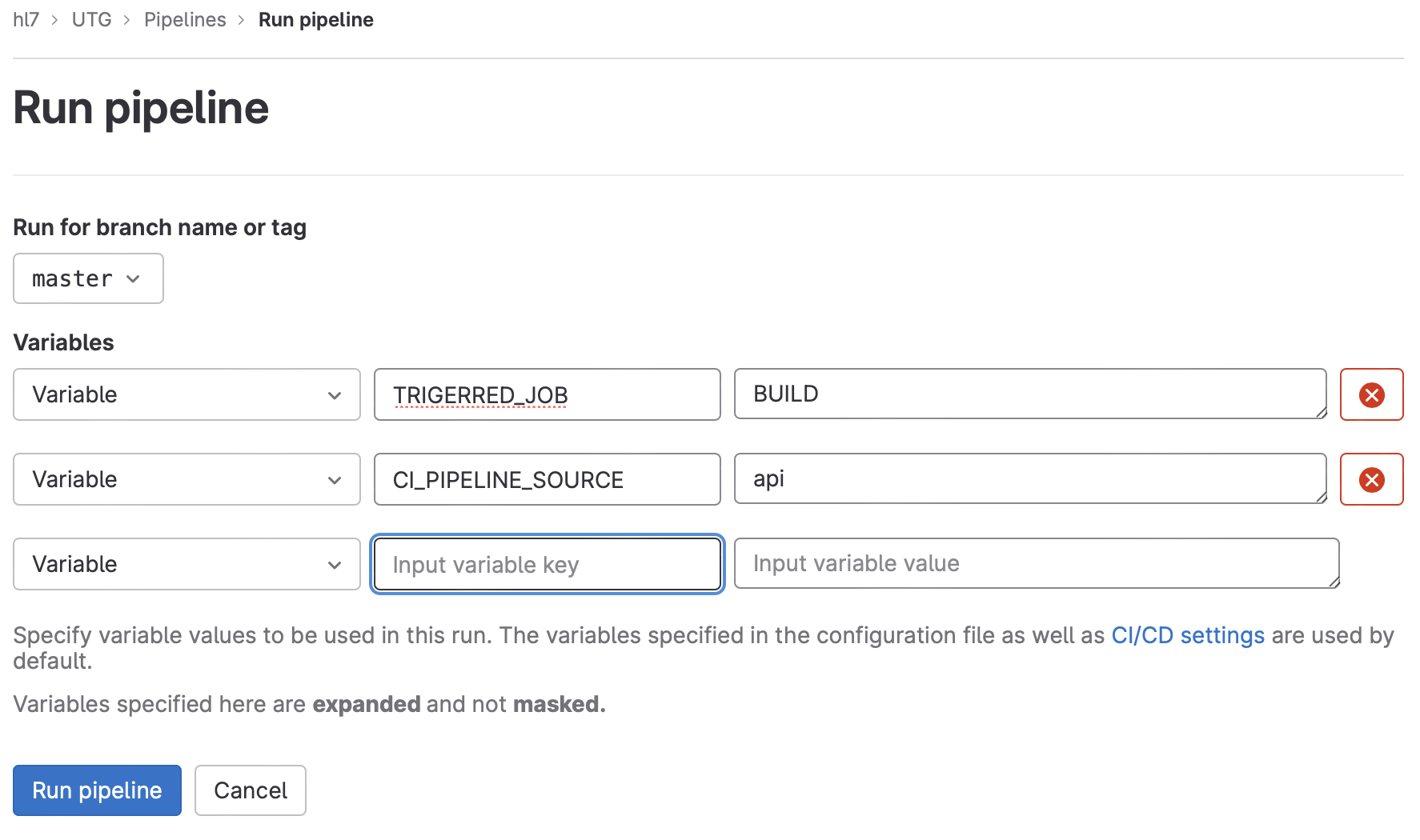
To kick off an ad hoc build without submitting the ticket (such as to show to a Work Group for review prior to approval), navigate to https://gitlab.hl7.org/hl7/UTG/-/pipelines/new and select your branch. Enter the two variable key/value pairs below and click ‘Run Pipeline’ to kick off the build.
- TRIGERRED_JOB = BUILD
- CI_PIPELINE_SOURCE = api
To rerun the build to fix an issue, pull the proposal back into Proposal Draft if the UP ticket is not already in that state, make/commit your changes, and then resubmit the ticket or run another ad hoc build.
To rerun the build for another reason (i.e., build failed due to server being down, etc.) you can go to the build pipeline via https://gitlab.hl7.org/hl7/UTG/-/pipelines and click the 'recycle' button next to your branch build to rerun it.
BUILDS
- UP-339
- UP-340
- UP-401
- UP-427
- UP-43
- UP-482
- UP-483
- UP-492
- UP-493
- UP-494
- UP-495
- UP-496
- UP-497
- UP-500
- UP-501
- UP-502
- UP-503
- UP-504
- UP-505
- UP-507
- UP-509
- UP-515
- UP-516
- UP-517
- UP-518
- UP-519
- UP-520
- UP-521
- UP-522
- UP-523
- UP-524
- UP-525
- UP-527
- UP-528
- UP-529
- UP-530
- UP-531
- UP-532
- UP-533
- UP-544
- UP-548
- UP-550
- UP-551
- UP-552
- UP-553
- UP-554
- UP-555
- UP-556
- UP-558
- UP-559
- UP-561
- UP-571
- UP-572
- UP-574
- UP-575
- UP-576
- UP-578
- UP-582
- UP-585
- UP-586
- UP-590
- UP-593
- UP-594
- UP-596
- UP-597
- UP-598
- UP-599
- UP-601
- UP-602
- UP-614
- UP-616
- UP-617
- UP-618
- UP-619
- UP-621
- UP-622
- UP-623
- UP-624
- UP-625
- UP-626
- UP-627
- UP-631
- UP-632
- UP-633
- UP-634
- UP-636
- UP-641
- UP-644
- UP-648
- UP-649
- UP-650
- UP-651
- UP-654
- UP-655
- UP-656
- UP-659
- UP-663
- UP-664
- UP-665
- UP-666
- UP-667
- UP-668
- UP-669
- UP-670
- UP-678
- UP-680
- UP-681
- UP-683
- UP-684
- UP-686
- UP-688
- UP-689
- UP-691
- UP-692
- UP-696
- UP-697
- UP-698
- UP-699
- UP-703
- UP-709
- UP-710
- UP-712
- UP-713
- UP-714
- UP-716
- UP-718
- UP-720
- UP-723
- UP-738
- UP-739
- UP-740
- UP-741
- UP-742
- UP-743
- UP-744
- UP-747
- UP-748
- UP-752
- UP-753
- UP-755
- UP-757
- UP-762
- UP-763
- UP-764
- UP-767
- UP-769
- UP-772
- UP-777
- UP-780
- UP-781
- UP-783
- UP-789